
used for loading font family (do’nt delete
Transform siloed data into actionable intelligence. Skypoint’s AI Platform accelerates data-centric AI initiatives for healthcare, so you see results in weeks, not months.

Transform siloed data into actionable intelligence. Skypoint’s AI Platform accelerates data-centric AI initiatives for healthcare, so you see results in weeks, not months.
Our HITRUST r2 Certified AI Platform for the healthcare industry helps you unify your data, uncover insights, and optimize productivity.

Our HITRUST r2 Certified AI Platform for the healthcare industry helps you unify your data, uncover insights, and optimize productivity.
Connect with Skypoint at healthcare events, read our customer stories, and catch up on the latest AI developments on our blog.

Connect with Skypoint at healthcare events, read our customer stories, and catch up on the latest AI developments on our blog.
Our team of AI and BI experts helps healthcare organizations solve operational inefficiencies and enhance productivity through unified data and industry-specific compound AI systems.

Our team of AI and BI experts helps healthcare organizations solve operational inefficiencies and enhance productivity through unified data and industry-specific compound AI systems.

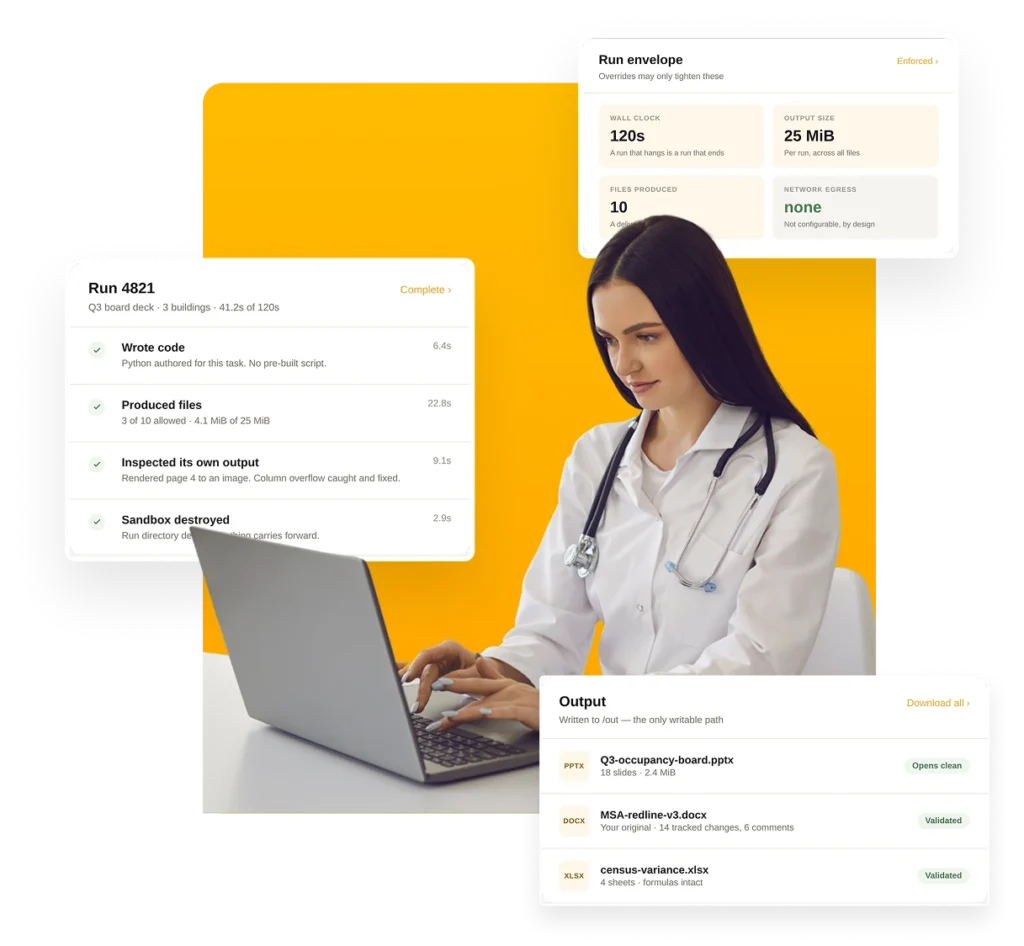
skyComputer builds the board deck, redlines the contract and completes the payer form, inside the Skypoint apps your team already uses. There is nothing to code or maintain.
Every task runs in a private, HITRUST r2 certified workspace that sees only what it’s given and is wiped when it’s done.




It tells a person what to do, and the person still does it.

An assistant can tell you occupancy slipped in three buildings. Someone still opens PowerPoint at eleven at night and rebuilds the board deck by hand.

Legal does not want a new agreement generated. They want this one, redlined, with tracked changes a counterparty can accept or reject clause by clause.

Your EHR may run through Citrix. The payer portal is a web form. Most AI can’t get in, so the task lands back on your team.
Six ways it turns a request into finished work.
Ask in plain English. There are no scripts for your team to build, and nothing to fix when a form changes.
Word, Excel, PowerPoint and PDF files that open cleanly and are ready to send. Not a rough draft someone has to reformat.
It marks up your contract, not a new one. Reviewers see exactly what changed and accept or reject each edit.
It reviews each file before you see it, so a broken table or a cut-off column gets fixed first.
It uses your EHR or payer portal the way your staff do, even through Citrix. No integration project first.
Schedule tasks to run on their own. It only changes records when someone approved that in advance.
For operators. Turns a change in a KPI into a written brief and a costed next step, before anyone opens a dashboard.
For compliance teams. Turns survey findings into a plan of correction and tracks every deficiency to closure.
For admissions. Reads the inbound referral fax and enters the record in the systems that need it.
For contracts. Drafts the agreement, marks up the other side’s version and routes it for signature.
For care teams. Works directly in the EHR where no integration exists, even through Citrix.
For executives. Builds the board deck from live data and delivers a real PowerPoint file, not a screenshot.
For revenue cycle. Completes the payer’s form, attaches the clinical evidence and follows the case to a decision.
Health Plan customer example. At a Medicare Advantage health plan, staff re-key the same patient data across five systems, and the EHR runs as a Citrix application. skyComputer works in that application (skyCare) the way a person would, so automation can start before any integration exists.
AI chat assistants can write and summarize, but they weren’t built for your documents, your systems or healthcare permissions. RPA bots can click through an application, but they break when the screen changes.
| Capability | skyComputer | AI chat assistants | RPA bots |
|---|---|---|---|
|
Handles new tasks without pre-built scripts |
Yes |
Yes |
No, recorded in advance |
|
Delivers finished Word, Excel and PowerPoint files |
Yes |
Partial |
Limited |
|
Edits your own document with tracked changes |
Yes |
Limited |
No |
|
Checks its own work before you see it |
Yes |
Limited |
No |
|
Works in systems that don’t connect |
Yes |
Limited |
Yes, but brittle |
|
No internet access during a task |
Yes |
Varies |
No |
|
Wiped after every task |
Yes |
Varies |
No |
|
Sees only what that person may see |
Yes |
Varies |
No, shared robot account |
|
HITRUST r2 certified environment |
Yes |
Varies |
Varies |
Doing real work means touching real data. skyComputer runs inside Skypoint’s HITRUST r2 certified, SOC 2 Type II environment, with six safeguards on every task.
It runs as its own service, with none of the application’s passwords, keys or storage access.
Each task gets only the files that person is allowed to see. Nothing else on the system is visible.
It can’t browse the web or send data out. No setting can turn that on, and an automated test checks it on every build.
Access is checked under the person’s own identity before the task starts, then checked again by the service that runs it.
Any file access it gets is read-only and expires in fifteen minutes.
Each task gets a fresh workspace that’s deleted when it’s done. Nothing carries over to the next task or customer.
Need a file from outside? Skypoint fetches it from sources your organization approved and hands it in before the task starts. PHI stays in your environment and is never shared with AI model providers. See our security page for certifications.
Each run gets three mounts: the application image and its input files, both read-only, and one writable output path. There is no host environment, no secrets and no network. Mounts are resolved under the caller’s identity, then re-checked by the execution service against the owner prefix on each path, using short-lived, read-only tokens. The sandbox is destroyed after one command. This is the whole command:
sandbox do \
  --mount /app:ro        # the image, read-only
  --mount /in:ro         # only the files this run was handed
  --mount /out:rw        # the only writable path
  --env IN_DIR OUT_DIR   # two paths. no host environment.
  --allow-egress         # never passed. a build test pins it.
| CONTROL | LIMIT | WHY IT EXISTS |
|---|---|---|
|
Wall clock |
120 seconds |
A run that hangs is a run that ends |
|
Output size |
25 MiB per run |
Bounds what a single task can produce |
|
Files produced |
10 per run |
Keeps a run to a deliverable, not a dump |
|
Input per mount |
50 MiB |
Staged, validated and read-only |
|
Mounts |
32 maximum |
The boundary stays small enough to reason about |
|
Concurrency |
1 per instance |
Requests beyond it queue rather than contend |
|
Network egress |
None |
Not configurable, by design |
Every run has a ceiling. Limits are published, enforced and visible to your administrators, and per-tenant overrides may only tighten them. Outputs pass the same validation, budget and storage path as work the platform does in-process.
A chat assistant works in a general-purpose environment and hands back a result. skyComputer works inside a healthcare platform that already knows who is asking, what that person may see and which of your systems the result belongs in. It produces files in the formats your business uses, and every task is limited, audited and wiped afterward.
No. Internet access is never switched on inside a task, and an automated test checks that on every build. If a task needs an outside file, Skypoint fetches it from sources your organization approved and hands it in before the task starts.
No. Each task gets only the files the application approved for that person, and access is checked twice: once under their identity before the task starts, and again by the service that runs it. That service holds no storage keys of its own, only short-lived, read-only access to the files it was handed.
It means the AI uses an application’s screens the way a person would. At Element Care, a PACE organization in Massachusetts, staff re-key the same patient data across five systems, and the EHR runs as a Citrix application. skyComputer can work in that application before any integration exists. Where a direct integration is available, Skypoint uses it instead.
No. The AI writes the steps for each task, so there is no script library to maintain and nothing to re-record when a vendor changes a screen or a report format. Skypoint’s forward-deployed engineers work alongside your team during rollout, and that is included in Growth and Enterprise plans.
Yes. Every task runs inside Skypoint’s HITRUST r2 certified, SOC 2 Type II environment, with encryption, role-based access and audit logging built in rather than added afterward. PHI stays inside your environment.
Your team does. skyComputer only writes to your systems when the person who set up the task approved those changes in advance. Otherwise it changes nothing and hands back files for review.
Skypoint connects to more than 250 systems, including EHR, payer, claims, ERP, HR and scheduling tools, and can both read and write. Where no integration exists, skyComputer can use the application’s screens directly.
No. Skypoint shares no customer data with AI model providers.
Bring one document that has to be changed, or one workflow stuck behind software with no API. We will run it in a working session.